An invoice lands on taxservice.am. You find out on your phone.
Hashiv is a read-only mobile view of the invoice section of taxservice.am. Notifications the moment an invoice is sent or received, status and statistics across every legal entity you manage, and your own project and material tags — none of which the desktop site gives you.
- boltPush in seconds, not a login
- domainEvery entity in one app
- lockRead-only by design
Log in with your existing taxservice.am credentials — nothing to sign up for.
Recent
See allHow it works
- download
1. Download the app
Install Hashiv on your phone. No account creation, no separate password.
- key
2. Log in with taxservice.am
Use the same credentials you already use on taxservice.am. We pass them through — we never store them.
- description
3. Track your invoices
See statuses and stats, add legal entities, tag invoices by project or material/service.
A mobile front door to your invoices
Hashiv doesn't replace taxservice.am — it's a faster way to read it on your phone.
- notifications_active
Instant notifications
Get notified the moment an invoice is sent or received, without opening taxservice.am.
- domain
Several legal entities
Add every company you manage and get notifications across all of them in one app.
- task_alt
Payment status
Mark an invoice as paid yourself, since taxservice.am doesn't track that for you.
- verified
Approval status
Fetched straight from taxservice.am, so you always see where an invoice actually stands.
- bar_chart
Spending statistics
Issued and received totals over time, broken down however you need.
- folder
Project tags
Assign invoices to the project they belong to, for reporting taxservice.am doesn't offer.
- inventory_2
Material & service tags
Tag what an invoice is actually for, so nothing gets lost in a pile of numbers.
- notifications
Payment reminders
Mark an invoice as paid and set a reminder notification so nothing slips past its due date.
- content_copy
Copy to pay
Copy an invoice's payment credentials and amount straight from the app to paste into your banking app and pay on the go.
The same invoice, two ways to read it
On taxservice.am an invoice is an A4 form built for printing: three signature blocks, full legal names, a VAT table, and the figure you actually need somewhere in the middle. Hashiv reads the same record and shows the six things you act on.
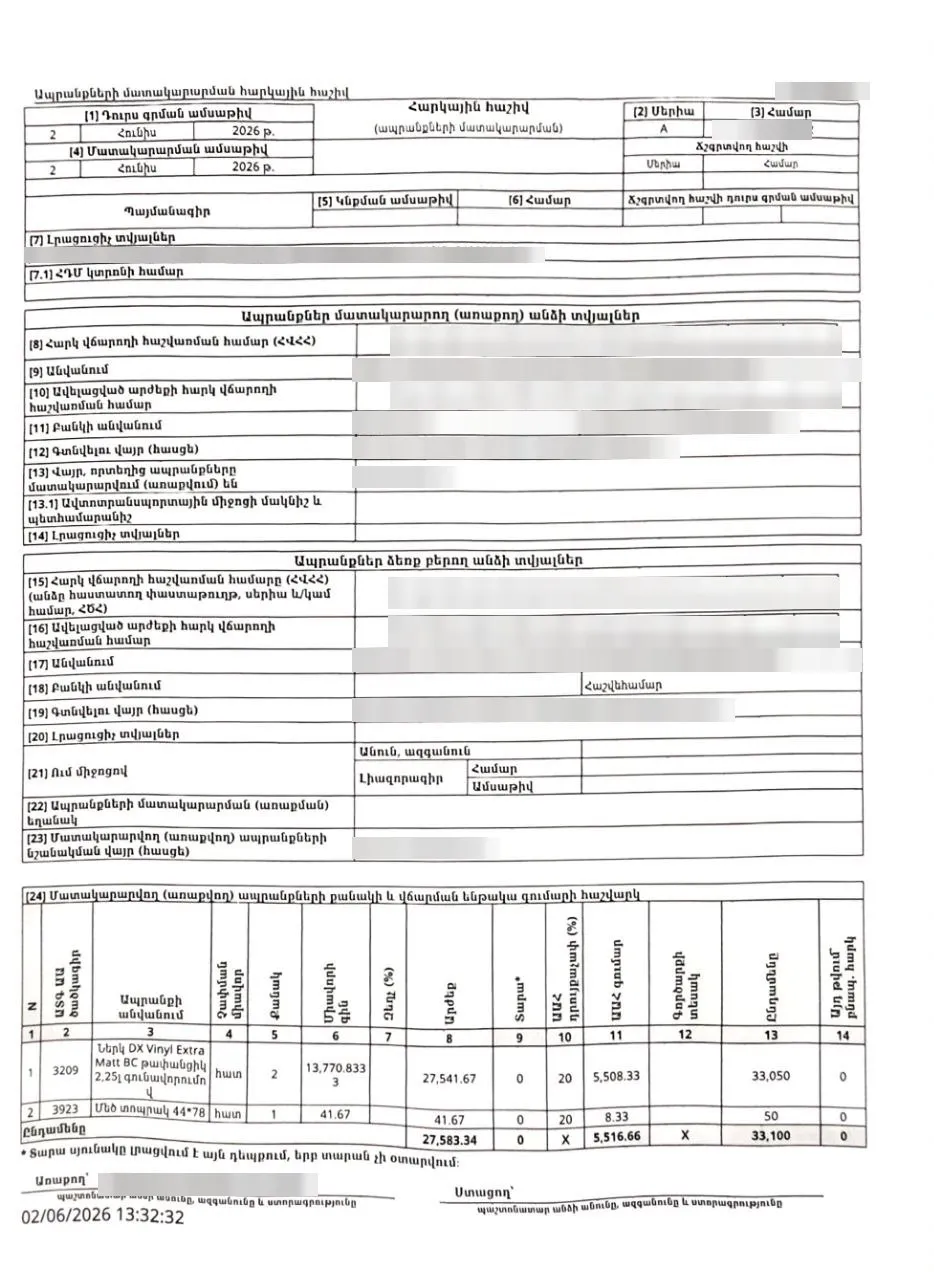 the figure you came for
No status, no payment state, no tags, no notification — and nothing you can act on without a desktop.
Supplier and TIN redacted
- categoryTagged Ներկ
- historyReceived 2 Jun → pending approval
- content_copyRequisites copied for your bank app
Same record, read live from taxservice.am. Six lines instead of a page.
The most important invoice details, on one screen
One invoice page brings together the total amount, payment and approval status, your project and material tags, and an approval timeline — with Mark as paid always one tap away — everything taxservice.am spreads across a full desktop page, in a single mobile screen.
One inbox for every legal entity
Invoice received, signed, or due for payment — notifications arrive the moment something changes on any company you've added, each one tagged with which entity it's for.
What Hashiv doesn't do
Read-only, by design — so there's nothing of yours for us to lose, and nothing you can accidentally break.
- database_off
We don't store your data
Invoice data is read live from taxservice.am each time — nothing is kept on our servers.
- password
We don't store your credentials
Your taxservice.am login is used to connect and never saved by Hashiv.
- edit_off
We don't sign or submit invoices
Hashiv is read-only. Every action that matters still happens on taxservice.am.
We're testing with a small group first
Join the beta to get early access and shape what Hashiv becomes — feedback goes straight to the team.
Get Hashiv on your phone
Beta builds are shared directly with joined testers.
There's no public download yet. Join the beta and the app arrives through Firebase — including every later build.